AI Staging for Airbnb: Design Listings That Earn 5-Star Reviews (2026)
Introduction
Your Airbnb listing has seven seconds to make an impression. That's how long the average guest spends on a listing before deciding to click through — or move on to the next one. Airbnb interior design tips are no longer a nice-to-have. They're the difference between a listing that fills its calendar and one that sits empty. According to Airbnb's own platform data, 73% of guests say listing photos are the most important factor in their booking decision — more than price, location, or reviews.
The challenge for most hosts is time and budget. Hiring an interior designer costs thousands. Physical staging requires days of logistics. Professional photography isn't always accessible. AI staging changes all of that. In 2026, Airbnb hosts can transform any room — empty, tired, or poorly lit — into a photorealistic, guest-ready space in seconds, using free AI tools that require no design experience. This guide shows you exactly how.
Key facts for Airbnb hosts in 2026:
- Airbnb guests view an average of 12–15 listings before booking — your cover photo and first five images determine whether they click through or scroll past.
- Listings with professional-quality photos earn up to 40% more revenue annually than those with poor imagery (Airbnb, 2024).
- AI staging transforms empty or poorly designed rooms into photorealistic, guest-ready spaces in seconds — for free or under $5 per image.
- Consistent design themes, optimised lighting, and Instagrammable focal points are the three highest-impact Airbnb interior design upgrades.
- Superhosts earn 64% more per year than standard hosts, and design quality is a leading factor in achieving Superhost status (AirDNA, 2025).
- REimagineHome and Virtual Staging AI offer free tiers requiring no credit card. Decory is subscription-based.
Why Interior Design Determines Airbnb Success
Interior design directly affects Airbnb booking conversion rates, nightly pricing power, and guest review scores. Listings with professional-quality photos earn 40% more annual revenue. Guests viewing 12–15 listings before booking make decisions almost entirely based on visual impression. Airbnb is a visual marketplace — guests can't visit before they book, so your photographs are the property. Every décor decision, every lighting choice, every staging detail is translated directly into revenue.
Three business metrics tie directly to design quality:
- Booking conversion rate: A well-designed listing with cohesive, appealing photos converts significantly more profile visits into actual bookings. Poor photos mean browsers never become guests.
- Nightly pricing power: Hosts with well-staged, aesthetically consistent listings command 20–30% higher nightly rates than comparable properties with weak photography. Design creates perceived value.
- 5-star review scores: Guest experience begins before check-in — it starts the moment they see your listing photos. When guests arrive and the space matches (or exceeds) their expectations, 5-star reviews follow naturally.
What Is AI Staging for Airbnb?
AI staging for Airbnb is the process of using artificial intelligence to digitally furnish and redesign room photographs, transforming empty or poorly designed spaces into photorealistic, guest-ready interiors. The AI analyses the room's geometry, lighting, and dimensions, then automatically places photorealistic 3D furniture and décor — delivering results in seconds.
How it differs from traditional staging: physical staging involves renting real furniture — expensive, slow, and impractical for hosts who can't afford to leave a property empty for days. Human virtual staging involves a graphic designer manually editing photos, taking 24–48 hours and costing $30–$75 per image. AI staging automates the entire process, delivering results in seconds at a fraction of the cost.
How AI Staging Works
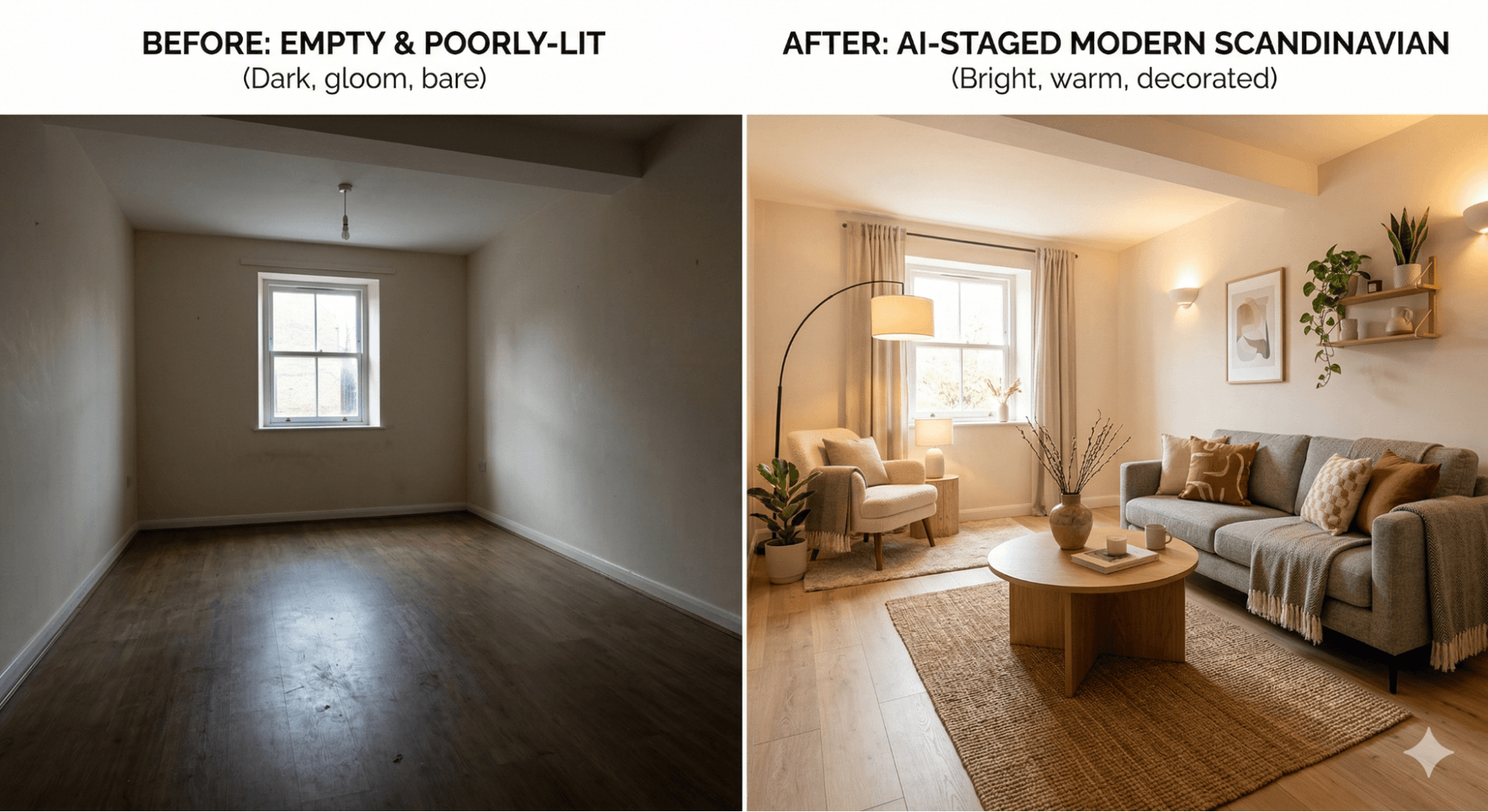
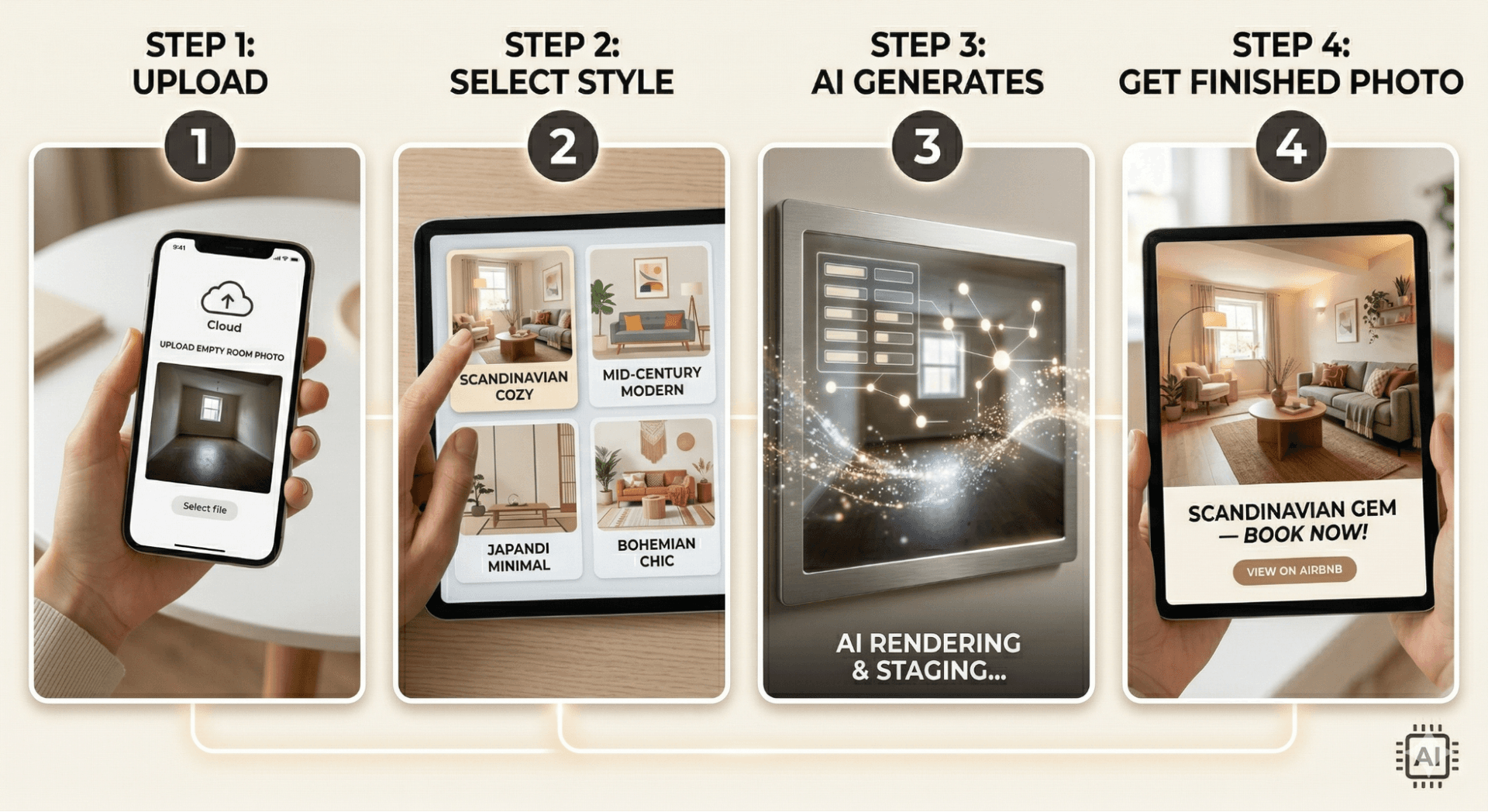
AI staging works in four steps: upload a room photo, select a design style (modern, cozy, Scandinavian, luxury, boho, etc.), let the AI generate a furnished version with matched lighting and perspective, then download the staged image for your Airbnb listing. Most platforms deliver results in under 60 seconds.
- Step 1 — Photograph your space. Take a clear, well-lit photo from a corner at chest height. Use a wide-angle lens or smartphone. Natural daylight produces the best results. Resolution should be at least 1,500 × 1,000 pixels.
- Step 2 — Upload to your AI staging tool. Navigate to your chosen platform. Upload the photo and specify the room type — bedroom, living room, kitchen, bathroom — to improve the AI's furniture selection.
- Step 3 — Select your design style. Choose a theme that fits your target guest demographic. Coastal and Scandi styles suit beach or countryside properties. Modern minimalist works for urban apartments. Boho or rustic suits rural retreats. Most AI platforms offer 15–50+ style presets.
- Step 4 — Generate, refine, and download. The AI produces a photorealistic furnished result in 10–60 seconds. Review for correct furniture scale and lighting consistency. Regenerate until you're satisfied, then download in high resolution.
Top Airbnb Interior Design Tips
The highest-impact Airbnb interior design tips are: establish one consistent design theme throughout the property, optimise natural and artificial lighting, add at least one Instagrammable focal point per room, use space-saving multifunctional furniture, and balance aesthetics with genuine comfort.
1. Commit to a single, consistent theme
The most successful Airbnb listings tell a visual story. Guests are drawn to a "cozy coastal cottage" or a "sleek urban studio" — not a mix of unrelated furniture from different eras and styles. Choose one theme and apply it throughout every room: consistent colour palette, matching furniture finishes, and coordinated textiles. AI design tools make this easy — upload photos of every room and apply the same style preset to all of them, achieving a coordinated look that would otherwise require a professional interior designer.
2. Optimise your lighting
Lighting is the single most undercorrected factor in Airbnb listings. Dark, flat photos suppress bookings. Warm, layered lighting creates the inviting atmosphere that generates clicks. Layer three light sources in every room: natural light (maximised with sheer curtains, not blackouts), ambient ceiling light (warm white bulbs, not cool fluorescent), and accent lighting (bedside lamps, pendant lights, under-shelf strips). When photographing for your listing, shoot during golden hour for maximum warmth and appeal.
3. Create at least one Instagrammable focal point
Guests share their stays on social media — and when they do, they become free marketing for your listing. Every room should have one deliberate photographic moment: a statement headboard, a curated shelfie, a window seat with cushions, or a neon sign above the sofa. These focal points also generate authentic UGC (user-generated content), which drives organic discovery on Airbnb and social platforms alike.
4. Use space-saving, multifunctional furniture
Guests value comfort and space above everything else. Overcrowded rooms feel smaller and generate comments in reviews. Use furniture that serves double duty: ottomans with storage, fold-down desks, sofa beds with quality mattresses, wall-mounted shelving. AI design tools are particularly useful here — they optimise furniture placement and proportion based on room dimensions, suggesting layouts that feel spacious even in compact spaces.
5. Balance aesthetics with genuine comfort
A listing that photographs beautifully but delivers a poor physical experience generates one-star reviews. Every design decision should prioritise guest experience: quality mattresses, high-thread-count linen, blackout blinds for sleep, comfortable seating for longer stays. Aesthetic decisions should never compromise physical comfort. The goal is a space that guests love both in photos and in person.
Best AI Tools for Airbnb Staging in 2026
1. Decory AI — Best for Full Interior Design + Staging
Decory AI is the standout choice for Airbnb hosts because it combines AI staging with a full interior design platform. Unlike tools that simply drop furniture into a photo and stop, Decory AI lets you edit specific areas of the generated design, swap furniture pieces, explore shoppable product links for every item shown, and apply consistent style presets across all rooms. For hosts managing multiple properties, this means staging every room to a consistent aesthetic standard — quickly, affordably, and without a designer. For guests, it means listing photos that inspire an emotional response and drive bookings.
- Instant AI room designs — coastal, Scandi, modern, boho, contemporary, and more
- Editable designs — swap furniture, adjust specific areas, refine until it's perfect
- Shoppable product links — see the exact items used in your AI design and buy them directly
- 20+ curated design style presets — match your property's location, character, and target guest
- Free to download — a Premium subscription is required to generate designs; no design experience needed
Pricing: Free to download; Premium subscription required to generate | Platforms: iOS, Android
2. REimagineHome — Best Output Quality
Produces highly photorealistic staged images across 50+ design styles. Excellent for Airbnb hosts who want to present luxury or boutique listings. Auto-generates MLS-compliant labels (useful if you also rent long-term). Day-to-dusk conversion included. Pricing: $14–$99/month | Free tier: 3 designs.
3. Virtual Staging AI — Fastest Turnaround
Delivers results in approximately 15 seconds — the fastest AI staging platform available. 30+ design styles, furniture removal, custom style upload. Ideal for hosts staging multiple properties or rooms quickly. Pricing: $16–$139/month | Free trial: Available.
4. Dreamhouse AI — Best Value Per Image
At approximately $0.05 per image on its unlimited plan, Dreamhouse AI is the most affordable option for high-volume staging. Interior and exterior staging, 35+ styles, under 10 seconds per render. Pricing: $29–$39/month | Free trial: Available.
How to Improve Your Airbnb Listing Photos with AI
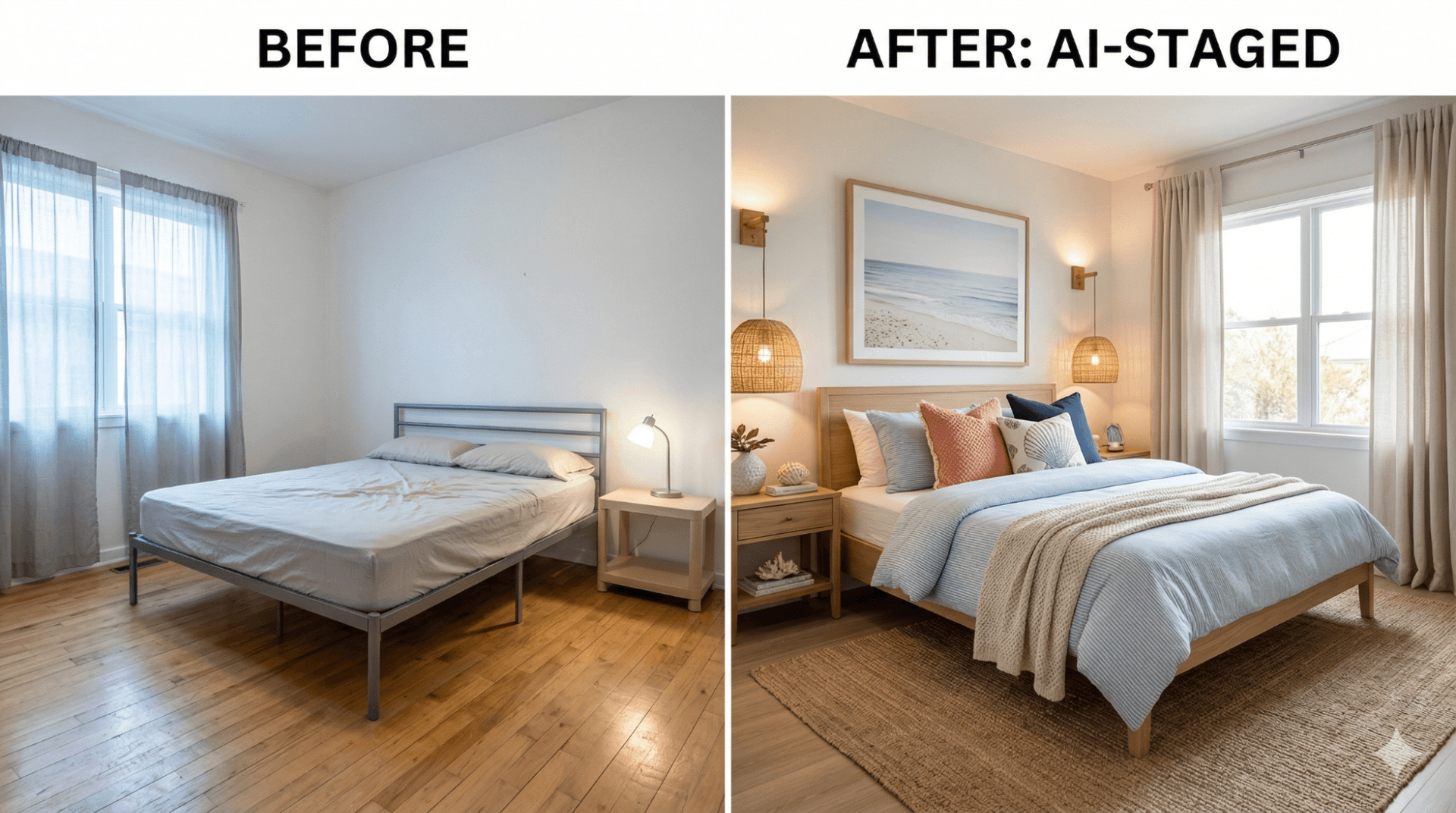
Improve Airbnb listing photos with AI by staging every empty or poorly furnished room using an AI tool like Decory AI, uploading clean well-lit source photos, applying a consistent design style across all rooms, and using before/after image pairs in your listing gallery to demonstrate the space's potential.
Listing photos are your highest-leverage conversion asset. The before/after impact of AI staging on Airbnb listing performance is consistent: hosts who upgrade their cover photo and first five images report higher click-through rates from search results and more completed bookings per view.
Practical photo optimisation checklist for Airbnb hosts:
- Stage every photographed room at the same quality level — inconsistency lowers trust
- Lead with your most visually impressive room as the cover photo
- Include at least 20 photos (Airbnb's algorithm rewards completeness)
- Shoot in landscape orientation (16:9) at minimum 1,500px width
- Include both wide-angle room shots and close-up detail shots (linens, amenities, focal points)
- Use AI staging to upgrade any room that currently shows poorly — especially bedrooms and the main living area
- Consider day-to-dusk AI conversion for exterior shots to show the property's evening atmosphere
Design Tips for Becoming a Superhost
To achieve Superhost status through design: maintain a consistently clean, clutter-free space that matches your listing photos exactly, add personal but non-intrusive touches like local art or a welcome hamper, ensure every practical need is met before focusing on aesthetics, and create an experience that guests describe as "thoughtfully designed."
Superhost status isn't just about response time and review scores — it's about the experience guests have from the moment they see your listing online to the moment they check out. The Superhost design principles:
- Match photos to reality. Nothing generates negative reviews faster than a property that looked beautiful online but arrived disappointing. Stage and photograph your actual space — not a fantasy version of it.
- Eliminate clutter ruthlessly. Clutter is the enemy of both good photography and positive guest experience. Remove personal items, reduce storage visible to guests, and create clear surfaces throughout.
- Add considered personal touches. A well-chosen local art print, a curated bookshelf, or a hand-written welcome note costs almost nothing and creates the feeling that guests describe as "thoughtfully designed" or "felt like a home."
- Invest in the bedroom above all else. Sleep quality is the most commonly cited factor in Airbnb reviews. A quality mattress, blackout curtains, sufficient pillows, and premium linen convert directly to 5-star ratings.
Common Mistakes to Avoid
- Overcrowding the space. More furniture does not mean more value to guests. Overcrowded rooms photograph poorly, feel claustrophobic, and generate negative comments in reviews.
- Mismatching your stated style with your actual design. If your listing description says "modern minimalist" but the photos show mismatched furniture, guests arrive with misaligned expectations.
- Photographing in poor light. Dark, dingy, or artificially yellow-tinted photos suppress bookings regardless of how good the underlying space is. Always photograph with maximum natural light.
- Ignoring the bathroom. Bathroom quality is a disproportionately important review factor. A clean, white, well-lit bathroom with fresh towels and good toiletries signals host attention to detail.
- Staging unrealistically. AI staging should show the space at its genuine best — not an impossible version of it. If guests arrive and find the actual room bears no resemblance to the AI-staged listing photos, your review score will reflect that.
The Future of AI in Short-Term Rentals
As of 2026, AI design tools are mainstream for Airbnb hosts — but the technology evolution continues to accelerate:
- Personalised styling by guest demographic. Future AI platforms will automatically style listing photos based on the demographic segment being targeted — presenting a beachside studio as a romantic couples retreat to one audience and a remote-worker productivity hub to another.
- Automated listing optimisation. Within 1–2 years, AI systems will likely be able to audit an entire Airbnb listing — photos, description, pricing, and reviews — and automatically suggest the specific design and photography changes most likely to improve booking conversion.
- AR-enhanced guest previews. Augmented reality features — already emerging on platforms like Decory AI — will allow prospective guests to "walk through" a virtually staged version of the space from their phone before booking.
- Dynamic seasonal staging. AI will enable hosts to maintain multiple staged versions of the same property — a cosy winter version and a bright summer version — switching between them on the listing automatically based on booking season.
Design is the highest-leverage investment an Airbnb host can make in 2026. Your listing photos determine whether guests click, book, and return. Your physical design determines whether they leave 5-star reviews that compound your visibility and pricing power over time. AI staging tools — led by platforms like Decory AI — have removed every traditional barrier to professional-quality listing presentation. You don't need a designer, a budget, or technical skills. You need a smartphone photo and 60 seconds.
The Airbnb hosts earning the most in 2026 aren't necessarily the ones with the best properties. They're the ones with the best-presented properties. Now you know how to become one of them.
Frequently Asked Questions
How do I make my Airbnb look attractive?
Focus on three things: establish one consistent design theme throughout the property, maximise natural and layered artificial lighting, and add at least one Instagrammable focal point per room. Clean, uncluttered spaces that match a clear aesthetic always outperform visually chaotic ones. Use an AI design tool like Decory AI to visualise improvements before physically rearranging anything.
Does staging improve Airbnb bookings?
Yes — significantly. Airbnb reports listings with professional-quality photos earn up to 40% more annual revenue. Well-staged properties with cohesive design themes achieve 2–4× higher booking conversion rates than unstaged equivalents. Staging improves click-through rates from search results, drives longer time-on-listing, and reduces the time between a guest viewing and booking.
What are the best Airbnb interior design tips for 2026?
The top five Airbnb interior design tips for 2026 are: commit to one consistent design theme, optimise three layers of lighting, create one Instagrammable focal point per room, use multifunctional space-saving furniture, and balance aesthetics with genuine comfort. AI design tools like Decory AI let you apply all five principles quickly, affordably, and without design experience.
How important are photos for Airbnb listings?
Airbnb photos are the single most important element of a listing. According to Airbnb's platform data, 73% of guests say photos are the primary factor in their booking decision — outranking price, location, and reviews. Listings with professional-quality photography earn 40% more revenue annually.
What makes an Airbnb get 5-star reviews?
Five-star Airbnb reviews come from properties where the actual experience exceeds what was shown in listing photos. Key factors: bedroom comfort and sleep quality, bathroom cleanliness and amenities, a clutter-free space that feels genuinely welcoming, and personal touches that guests describe as "thoughtfully designed." Stage accurately and deliver on your listing's promise.
What is the best AI staging tool for Airbnb hosts?
Decory AI is the top choice for Airbnb hosts because it combines AI staging with full interior design features — editable designs, 20+ curated style presets, and shoppable furniture links. REimagineHome leads on photorealism. Virtual Staging AI is fastest. All are significantly cheaper than physical staging or professional photography.
How much does AI staging cost for an Airbnb?
AI staging for Airbnb costs between free and $5 per image, depending on the platform. Monthly subscription plans range from $14 to $139/month. REimagineHome, Virtual Staging AI, and Dreamhouse AI offer free tiers requiring no credit card; Decory is subscription-based. This compares to $500–$2,000 per room for physical staging and $30–$75 per image for human virtual staging.
Ready to Transform Your Space?
Use Decory's AI-powered design tools to visualize your transformation. Upload a photo and explore endless possibilities in seconds.
Try Decory AI Now