AI Virtual Staging: The Complete Guide to Selling, Renting & Listing Properties Faster (2026)
AI virtual staging is one of the fastest-growing tools in real estate marketing — and for good reason. Empty rooms don't sell properties. Buyers scroll past vacant listings because they can't visualise the potential. According to RESA's Q1 2025 Home Staging Market Insights, vacant listings sit on the market 42% longer than staged equivalents. Traditional home staging solves this — but it costs $1,500–$6,000 per property, takes 2–7 days to arrange, and requires an empty property.
AI virtual staging solves the same problem in under 60 seconds, for under $5 per image, with no furniture trucks and no waiting. Real estate agents, developers, Airbnb hosts, and private sellers are already using AI staging software to attract more buyers, increase listing click-through rates, and close sales faster. This guide covers everything: a clear definition, the ROI data, step-by-step instructions, the best free and paid tools, and the legal requirements you need to know before publishing staged images in the US, UK, Canada, and Australia.
What Is AI Virtual Staging?
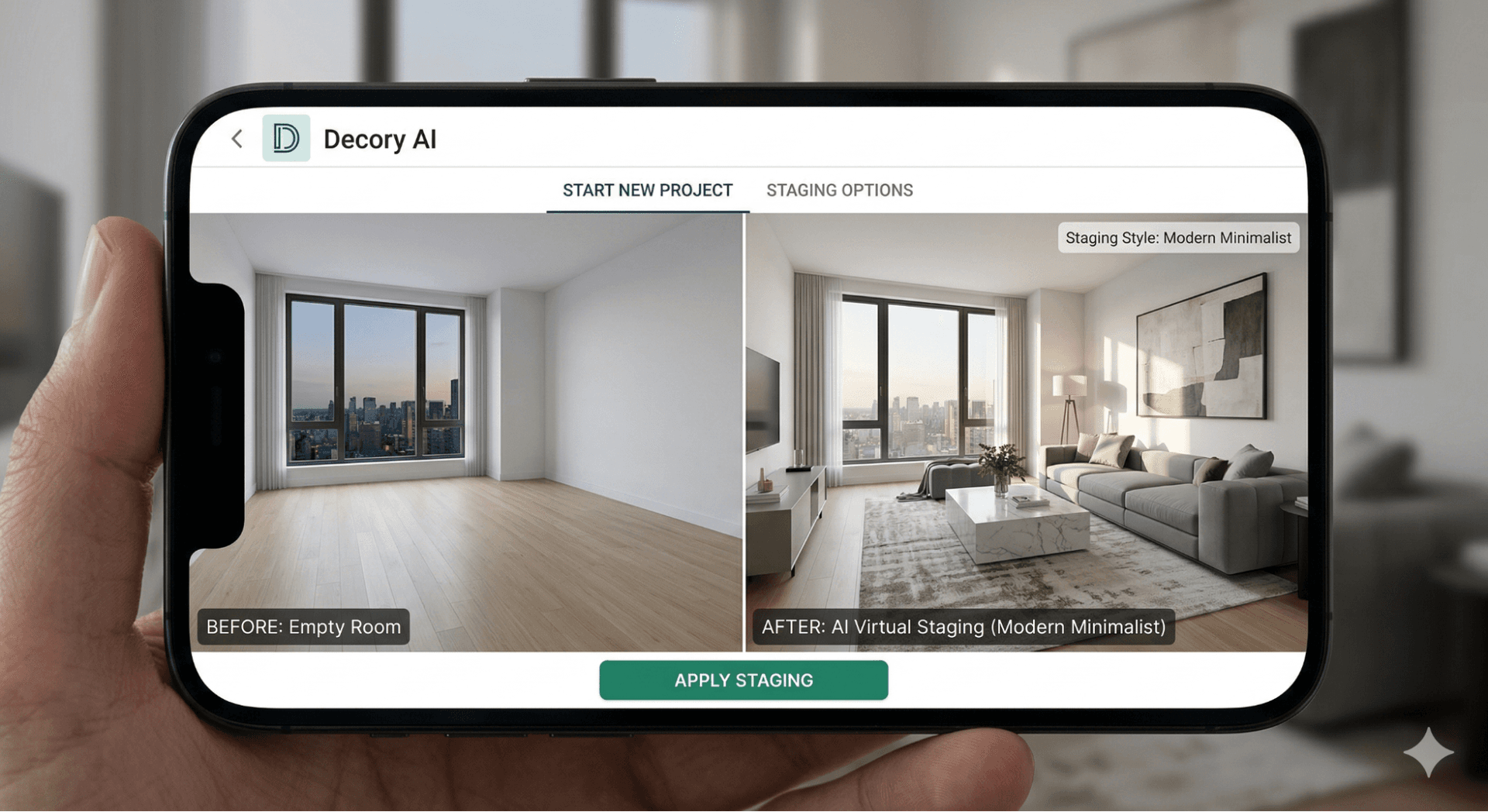
AI virtual staging is the use of artificial intelligence to digitally furnish and decorate photographs of empty or sparsely furnished rooms, producing photorealistic, listing-ready images in seconds — without physically moving a single piece of furniture. AI virtual staging uses machine learning models — specifically computer vision and generative AI — to analyse an empty room photograph, interpret its geometry, lighting, and perspective, and automatically place three-dimensional furniture renders that match the space.
The term "virtual staging AI" refers to the same process. "AI home staging" and "AI staging software" are commonly used interchangeable terms in the real estate industry. The difference from traditional virtual staging: traditional (human-powered) virtual staging requires a graphic designer to manually place and render furniture — a process that takes 12–48 hours and costs $16–$75 per image. AI virtual staging automates the entire process, reducing cost by 95–99% and delivery time to seconds.
How Does AI Virtual Staging Work?
Modern AI staging platforms are built on diffusion model architectures — the same underlying technology behind tools like DALL-E and Stable Diffusion — trained on millions of interior design photographs and MLS listing images. As of 2026, output quality has improved to the point where AI-generated staged images are frequently indistinguishable from professionally photographed physically staged properties.
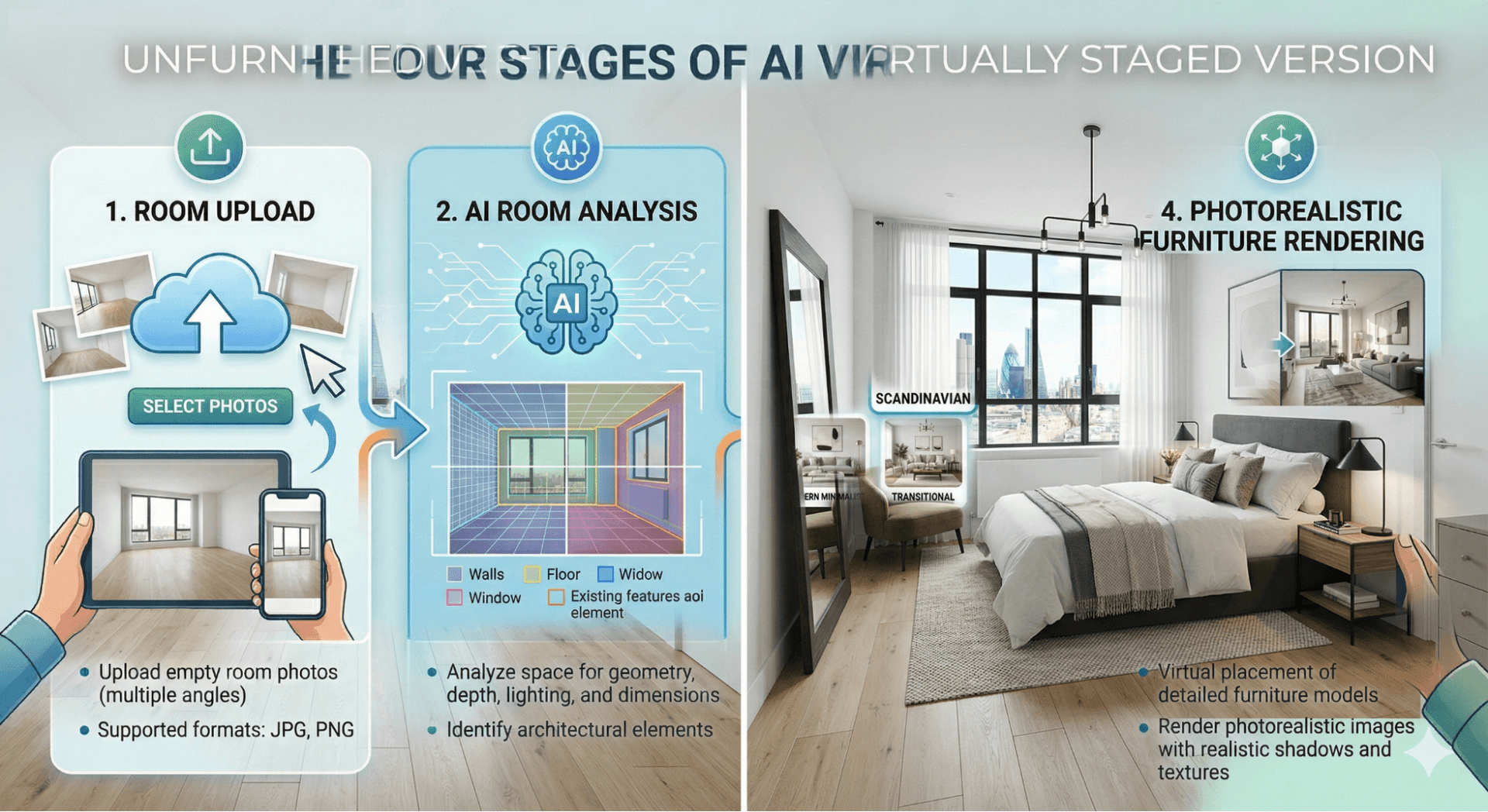
The process breaks into four technical stages:
- Stage 1 — Room analysis: Computer vision detects walls, floor, ceiling, windows, and existing objects. The model calculates perspective lines, shadow angles, and light source direction.
- Stage 2 — Style matching: The user selects a design style (modern, Scandinavian, farmhouse, industrial, boho-chic, coastal, or 30–50+ others). The AI selects appropriately sized furniture pieces from a trained 3D object library.
- Stage 3 — Photorealistic rendering: Each furniture item is scaled to correct proportion, positioned according to interior design principles, and rendered with matched shadows, reflections, and lighting.
- Stage 4 — Output delivery: The high-resolution image is delivered — typically in 10–60 seconds — ready for MLS upload, Rightmove, Zillow, Airbnb, or any property portal.
What Are the Benefits of AI Virtual Staging?
AI virtual staging benefits include faster property sales, 40% more online listing views, 31% more buyer enquiries, and 95–99% lower cost than physical staging. According to RESA (2025), staged homes sell up to 3× faster than unstaged equivalents, with an average $23.34 return on every $1 invested in staging.
1. Faster property sales
According to the NAR 2025 Profile of Home Staging — based on a survey of 1,266 REALTORS® — 49% of sellers' agents reported that staging reduced time on market. RESA's Q1 2025 Home Staging Market Insights found staged homes sell up to 3× faster than non-staged equivalents. For vacant properties, AI staging can be deployed on the same day as photography — eliminating the gap between shooting and listing.
2. Higher listing engagement and CTR
- Staged listings generate 40% more online views than empty-room equivalents
- Buyers spend 20% longer viewing staged listing photos
- Staged listings receive 31% more direct enquiries
- AI-staged listing thumbnails achieve approximately 90% higher click-through rates than empty room thumbnails on property portals
3. Exceptional cost savings
For a real estate agent managing 40 listings per year, the cost difference is dramatic: physical staging costs roughly $80,000/year ($2,000 avg per listing), AI staging at premium costs ~$5,760/year ($24/image × 6 rooms), and AI staging at free tier costs ~$240/year (~$1/image × 6 rooms). That represents a 99% cost reduction versus physical staging. Several platforms also offer free AI room design from a single photo with no credit card required.
4. Scalability for real estate professionals
As of 2026, a portfolio of 20 vacant listings can be fully staged in under 30 minutes using AI. There are no scheduling conflicts, no logistics, no waiting for delivery trucks. AI staging software scales with workload regardless of portfolio size.
Who Uses AI Virtual Staging? Key Use Cases
Real estate agents
The primary use case for virtual staging AI. Agents use AI staging to make vacant listings competitive instantly — reducing days-on-market, increasing online enquiries, and differentiating listing presentations. High-volume agents benefit most from the per-image cost efficiency.
Property developers and new-build marketers
New construction units are often sold while still empty. AI staging allows developers to show each unit furnished in multiple buyer-relevant styles without building physical show homes for every floor plan configuration.
Airbnb and short-term rental hosts
First impressions on Airbnb and VRBO listings directly determine booking rates. Well-presented listing photos command 20–30% higher nightly rates than poorly photographed equivalents. Hosts use free AI room design tools to upgrade their listing photography affordably.
Rental property landlords
Rental listings with empty room photos receive significantly fewer enquiries. Landlords and letting agents use AI staging to present properties attractively on Rightmove, Zoopla, Apartments.com, and Zillow Rentals — reducing vacancy periods.
FSBO (For Sale By Owner) sellers
Private sellers rarely have access to professional staging services. Free AI home design tools give FSBO sellers professional-quality presentation that levels the playing field against agent-listed properties.
Best AI Virtual Staging Tools in 2026
The tools below were assessed on output quality, turnaround speed, pricing, free tier availability, and MLS compliance features.
1. Decory AI — Best for Interior Design + AI Staging Combined
Decory AI is an AI-powered interior design application that goes beyond virtual staging to deliver a complete room transformation platform. Unlike tools that place virtual furniture and stop there, Decory AI connects AI-generated staged designs to shoppable real furniture links, allows users to edit specific areas of the generated design, and lets buyers explore different style interpretations of the same space. For real estate professionals, this creates a uniquely compelling buyer experience: buyers see not just what the property looks like staged, but exactly what their version of it could feel like — with the actual products they can buy to make it real. Available on iOS and Android globally, serving users across the US, UK, Middle East, and 200+ countries.
- Instant AI room designs — modern, minimalist, boho-chic, contemporary, and more
- Editable outputs — adjust specific areas, swap furniture, and refine until it's perfect
- Shoppable furniture links — show buyers the exact products that could furnish their new home
- Community inspiration — explore designs from real users across 200+ countries
- Free to download on iOS and Android — a Premium subscription is required to generate designs
2. REimagineHome — Best Output Quality
HousingWire's top-rated AI staging tool for 2026. Produces photorealistic results across 50+ design styles with support for exterior staging, landscaping, day-to-dusk conversion, and shoppable real-product furniture integration. Auto-generates MLS-compliant "Virtually Staged" labels. Pricing: $14–$99/month | Free tier: 3 designs, no credit card needed | Best for: Quality-first agents.
3. Virtual Staging AI — Fastest Turnaround
Delivers results in approximately 15 seconds — the fastest AI home staging platform on the market. Offers 30+ design styles, furniture removal, API access, and rollover credits. No credit card required for the free trial. Pricing: $16–$139/month | Best for: High-volume agents needing instant results.
4. Dreamhouse AI — Best Value Per Image
At approximately $0.05 per render on its unlimited plan, Dreamhouse AI is the most affordable AI staging software available as of 2026. Offers 35+ styles, interior and exterior staging, under 10 seconds per image. Pricing: $29–$39/month (~unlimited renders) | Best for: Budget-conscious agents at high volume.
5. AI HomeDesign — Best for MLS Compliance Workflow
Built-in "Virtually Staged" labelling tool, 3 style variations per photo, 20–30 second delivery, and partnerships with Keller Williams and RE/MAX. $0.24/image at highest volume tier. Pricing: From $19/month | Free: 3 images | Best for: Agents prioritising automated compliance labelling.
6. BoxBrownie — Best Human-Powered Option (UK & Australia)
Australian-founded, serving 120+ countries. Human-designed virtual staging at $24/image (pay-as-you-go) with a 48-hour turnaround. Excellent compliance track record in UK and Australian markets. Also offers floor plans, day-to-dusk, and 360° tours. Best for: UK and Australian estate agents requiring premium human-quality staging.
How to Use AI Virtual Staging: Step-by-Step
Step 2 — Upload to your chosen platform
First, photograph your space using a wide-angle lens or quality smartphone camera. Shoot from a corner at chest height so the full room is visible. Ensure the space is clean, windows are allowing natural light, and image resolution is at least 1,500 × 1,000 pixels. Clean, sharp, well-lit source images produce dramatically better staging results. Then navigate to your AI staging tool and upload the room photograph. Most platforms accept JPEG and PNG. Specify the room type (living room, bedroom, kitchen, dining room) if prompted — this improves the AI's furniture selection accuracy.
Step 3 — Select your design style
Choose a style that matches the property's architecture and target buyer demographic. Modern city apartments suit minimalist or contemporary styling. Countryside properties suit farmhouse or transitional. Coastal homes suit relaxed coastal aesthetics. Most tools offer 30–50+ presets.
Step 4 — Generate and review
Generation takes 10–60 seconds. Review the output for: correct furniture scale, consistent shadow direction, natural perspective alignment, and absence of visual artefacts. Most platforms allow unlimited regenerations per credit — regenerate until you have the result you need.
Step 5 — Add your disclosure label
Before publishing, add a clear "Virtually Staged" or "Digitally Enhanced" label to every AI-generated image. In California (AB 723), also include the original unstaged photo alongside the staged version. Many AI staging platforms automate this labelling.
Step 6 — Publish across all portals
Export at high resolution. MLS portals require a minimum of 1,500 × 1,000 pixels. For Instagram, use 1,080 × 1,080. For Pinterest, use 1,000 × 1,500 vertical format. Include before/after image pairs wherever the platform allows — these consistently outperform single staged images in engagement metrics.
Best Practices for Property Listings
- Lead with kitchen and primary bedroom. According to Zillow and Realtor.com research, these two rooms drive the greatest buyer interest.
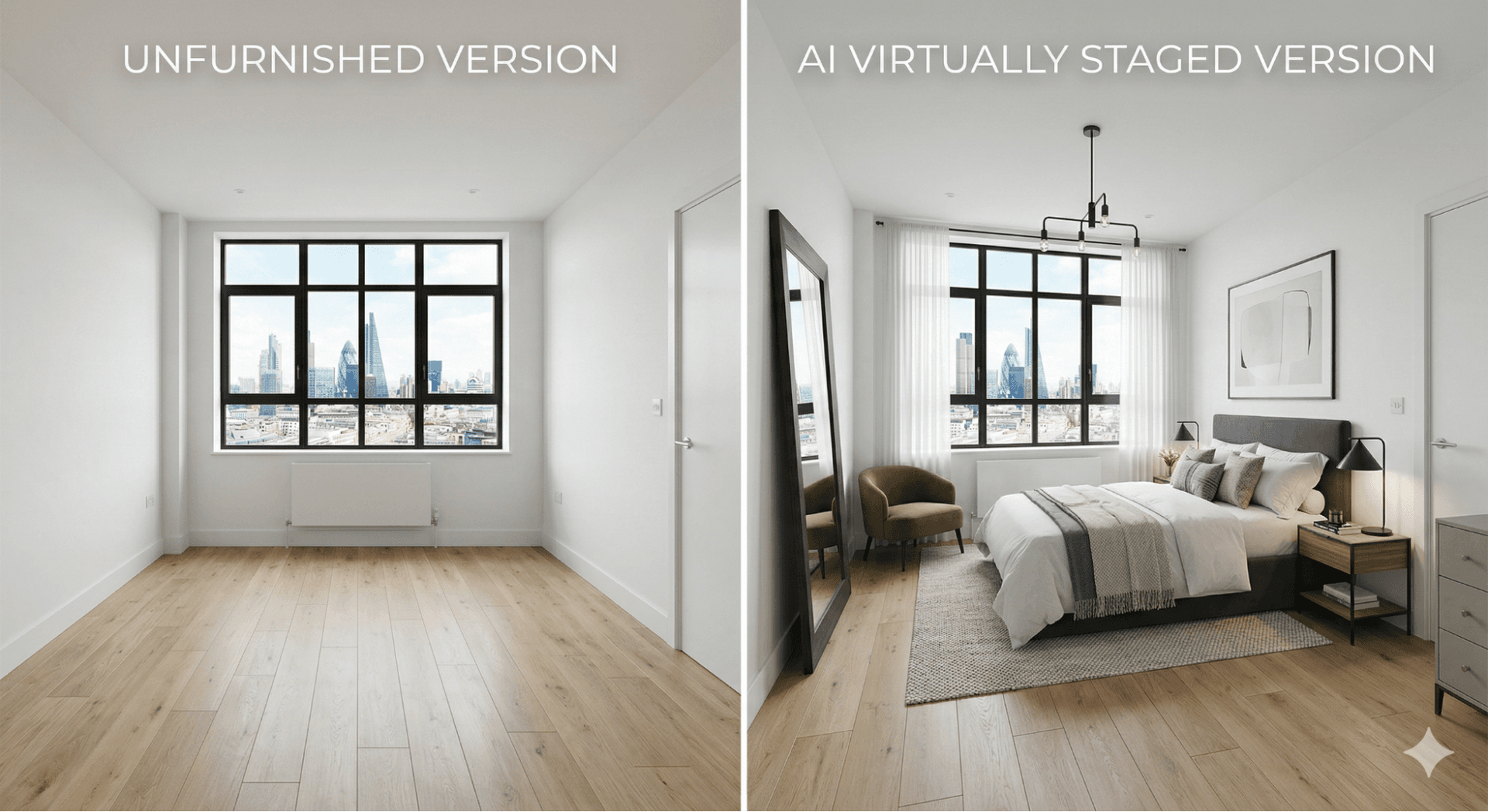
- Use before/after image pairs. Image carousels on Instagram, Facebook, and listing website galleries perform significantly better when buyers can compare the unstaged and staged versions side by side.
- Match style to your target buyer. A first-time buyer apartment in an urban area needs different styling to a five-bedroom family home in the suburbs.
- Stage all key rooms at consistent quality. If the living room looks professionally designed but the bedroom photograph is an empty white box, the contrast undermines the listing.
- Optimise file sizes for portal loading speed. Export at 85% JPEG quality rather than 100% to keep files under 500KB without visible quality loss.
- Always include unstaged companion photos. This is best practice in all markets and legally required in some.
Legal Requirements by Market
AI virtual staging is legal in all major markets when images are clearly labelled. Here is what you need to know in each jurisdiction:
United States
NAR Code of Ethics — Article 12 requires a "true picture" in all property representations. Standard of Practice 12-5 mandates "clear and conspicuous" disclosure of digitally altered listing images. California AB 723 (effective January 1, 2026) requires conspicuous disclosure on or near every digitally altered listing image, must provide access to the original unaltered photo, and violations are classified as a misdemeanour crime. The universal US rule: adding virtual furniture to empty rooms is legal everywhere in the US with proper disclosure. Altering structural features or hiding defects is never acceptable.
United Kingdom
The Digital Markets, Competition and Consumers Act 2024 (in force from April 6, 2025) makes misleading property marketing a criminal offence. Penalties include unlimited fines and up to 2 years imprisonment. UK practical requirements: label all virtually staged images as "Virtually Staged" or "Digitally Enhanced Image" in listings and printed property particulars, visible at all display sizes.
Canada
Provincial regulators govern disclosure. In a landmark 2024 enforcement case, BCFSA fined British Columbia agent Lori Evans $6,000 for digitally altered listing photos that concealed peeling paint. Brokerages face fines up to $500,000. Ontario's TRREB, Alberta's CREB, and all provincial bodies require disclosure of materially altered photos. Pan-Canadian principle: AI virtual staging can ethically show a space's potential — it cannot change the perceived condition of existing features.
Australia
Australian Consumer Law (Competition and Consumer Act 2010, Schedule 2) prohibits misleading or deceptive conduct in property marketing. Corporate penalties reach $50 million. Individual penalties reach $2.5 million. NSW Fair Trading has explicitly flagged digitally altering room proportions as misleading conduct. Best practice: include both staged and original photos, label clearly, and never alter structural features.
The Future of AI in Real Estate
As of 2026, AI virtual staging is mainstream — but the technology roadmap points toward more transformative applications:
- Personalised staging by buyer profile: Future platforms will serve different staged versions of the same listing based on the viewer's inferred preferences.
- Augmented Reality (AR) property viewing: Early AR staging tools already allow buyers to point a smartphone camera at an empty room and see it virtually furnished in real time.
- Automated full listing production: Within 2–3 years, AI systems will likely take a single set of property photographs and automatically produce a complete marketing package.
- Renovation and structural visualisation: Beyond furniture placement, future tools will allow buyers to visualise proposed renovations — new kitchens, bathroom upgrades, loft conversions.
- Conversational AI design: Platforms like Decory AI are evolving toward conversational design interfaces where users describe a preference and the AI interprets and executes it automatically.
AI virtual staging has permanently changed the standard for property presentation. The data — from NAR, RESA, and Florida Realtors — makes the case clearly: staged listings sell faster, attract more enquiries, generate higher offers, and outperform across every online engagement metric. AI makes all of this possible for under $5 per image, in under 60 seconds, for any property, anywhere.
Frequently Asked Questions
What is AI virtual staging?
AI virtual staging is the use of artificial intelligence to digitally add photorealistic furniture and décor to empty room photographs. The AI analyses room geometry, lighting, and perspective, then automatically places 3D furniture renders. Results are delivered in seconds, producing MLS-ready property listing images at a fraction of the cost of physical staging.
Is virtual staging legal in real estate?
Yes — AI virtual staging is legal in all major markets when images are clearly labelled. In the US, NAR's Code of Ethics requires disclosure of digitally altered images. California's AB 723 (effective January 2026) mandates labelling and access to the original photo. UK, Canada, and Australia have similar disclosure requirements.
Does virtual staging help sell a home faster?
Yes. According to NAR's 2025 Profile of Home Staging, 49% of sellers' agents reported that staging reduced time on market. RESA Q1 2025 data shows staged homes sell up to 3× faster than unstaged equivalents. Staged listings also generate 40% more online views and 31% more direct enquiries.
How much does AI virtual staging cost?
AI virtual staging costs $0.05–$5 per image depending on the platform. Monthly subscriptions range from $14–$139/month. This is a 95–99% saving versus physical home staging ($1,500–$6,000 per property). Several platforms offer free tiers requiring no credit card.
Can virtual staging be done for free?
Yes. Multiple AI virtual staging platforms offer free tiers as of 2026 — REimagineHome (3 free designs), Virtual Staging AI (free trial), AI HomeDesign (3 free images), and Dreamhouse AI (free trial) all offer free access with no design experience required.
Can AI stage a completely empty room?
Yes — AI virtual staging is specifically designed for empty rooms, which produce the best results. The AI fills the vacant space with appropriately scaled and styled furniture based on the chosen design theme. Empty rooms produce cleaner outputs because there are no existing objects to work around or remove.
Is AI virtual staging the same as Photoshop editing?
No. Traditional Photoshop editing requires a skilled designer to manually place, scale, and composite furniture — a process taking 12–48 hours. AI virtual staging is fully automated: the model processes the room and places furniture in seconds without human intervention. AI staging is faster, cheaper, and requires no technical skills from the user.
Ready to Transform Your Space?
Use Decory's AI-powered design tools to visualize your transformation. Upload a photo and explore endless possibilities in seconds.
Try Decory AI Now