How AI Interior Design Works: Technology Simply Explained
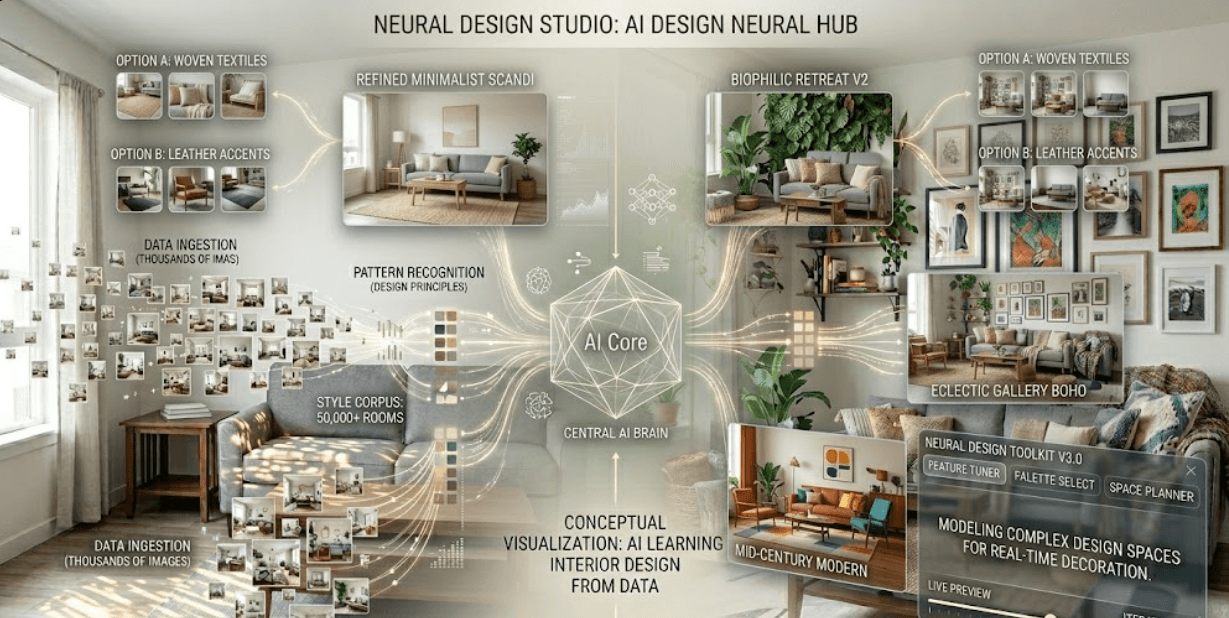
You've probably seen AI interior design tools pop up online. You upload a room photo, and within seconds, AI generates multiple redesign ideas. But how does it actually work? The magic behind AI interior design isn't magic at all — it's a fascinating technology based on simple principles: learning from examples, recognizing patterns, and making predictions.
This guide explains AI interior design in plain English — no confusing technical terms, just clear explanations of how the technology works, what it's good at, what it's limited by, and whether it's the right tool for you.
What is Machine Learning? (For Beginners)
Before understanding AI interior design, you need to know what machine learning is. Here's the simplest explanation: machine learning is technology that learns from examples instead of following a list of rules.
Think of it like this: A child learns to recognize dogs not by reading a definition, but by seeing thousands of dogs. After seeing enough examples, the child can recognize a dog they've never seen before. AI works the same way.
Traditional Software vs Machine Learning
Traditional software follows a programmer's exact instructions: "If X happens, do Y." Like a recipe — follow the steps exactly, get the same result every time. Machine learning is different: you show the computer thousands of examples, and the computer figures out the patterns. When it sees something new, it predicts based on those patterns.
How Machine Learning Applies to Interior Design
When you use an AI interior design tool, the AI isn't following a designer's rulebook. Instead, it learned by analyzing millions of real interior design photos and their characteristics. The AI learned: "When I see a small living room with limited light, successful designs typically include light colors, mirrors, and floating furniture." The AI didn't memorize specific rooms — it learned the patterns that make designs work.
Training Data: Millions of Interior Design Images
AI interior design tools are powered by something called training data — basically, thousands or millions of interior design photos. The developers collect millions of images from Pinterest, design blogs, and home sites. Each image gets labeled with information: room type, style, colors, furniture, and lighting. The AI analyzes these images, learning patterns such as "light walls make small rooms feel bigger" and "plants add warmth."
Why Millions of Images Matter
With 100 images, the AI would be limited. With 1,000 images, it's better but still missing patterns. With millions of images, the AI understands design deeply — it's seen eclectic rooms, minimalist spaces, bohemian styles, and everything in between. In simple terms: the AI learned interior design the same way you might by scrolling Pinterest for hours — except it looked at millions of images instead of hundreds.
This is why modern AI design tools are so accurate — they're trained on truly vast amounts of design data. The more examples the AI sees, the better it understands design.
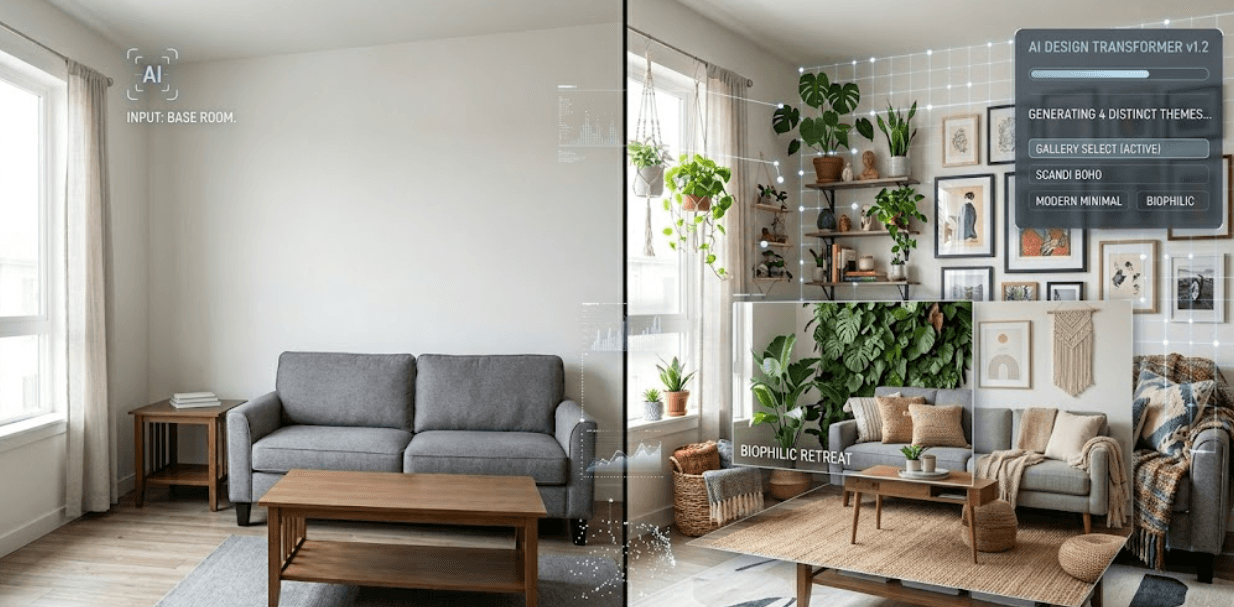
The AI Design Process: Step-by-Step
When you upload a room photo to an AI design tool, here's what happens behind the scenes:
Step 1: Photo Upload & Analysis
You take a photo of your room and upload it to an AI tool like Decory AI. The AI immediately analyzes the image — it doesn't just see a photo, it "understands" the room's characteristics including room dimensions and shape, wall color and condition, window placement and light level, existing furniture and fixtures, and floor type and color.
Step 2: Feature Detection
The AI breaks down your room into features: dimensions (is this a small 10x12 bedroom or a large 20x30 living room?), lighting (north-facing with low light, or south-facing and bright?), existing elements (what stays vs what can change), and constraints (is this a rental, a dorm, or a home?). In simple terms: the AI is getting to know your specific room before suggesting changes.
Step 3: Style Learning
You tell the AI what style you want: modern, bohemian, minimalist, eclectic, cozy, etc. The AI accesses everything it learned from millions of training images about that style — common color palettes, typical furniture pieces, how minimalist designers handle lighting, and what makes eclectic design work in small spaces.
Step 4: Design Generation
Now the AI combines everything: your room's characteristics, your chosen style, the design principles it learned, and practical solutions (what furniture actually fits, what color actually works in your light). The AI generates a complete redesign suggestion — new furniture layout, color scheme, décor ideas, and lighting suggestions. In simple terms: the AI synthesizes everything it knows about your room and your style to create a custom design.
Step 5: Variation Creation
Most AI tools don't just generate one design — they generate multiple variations. The AI might show you the same style with different color palettes, the same room layout with different furniture arrangements, budget options vs premium options, and multiple interpretations of your chosen style. Why? Because there's no single "perfect" design. Showing variations helps you find what resonates with you personally.
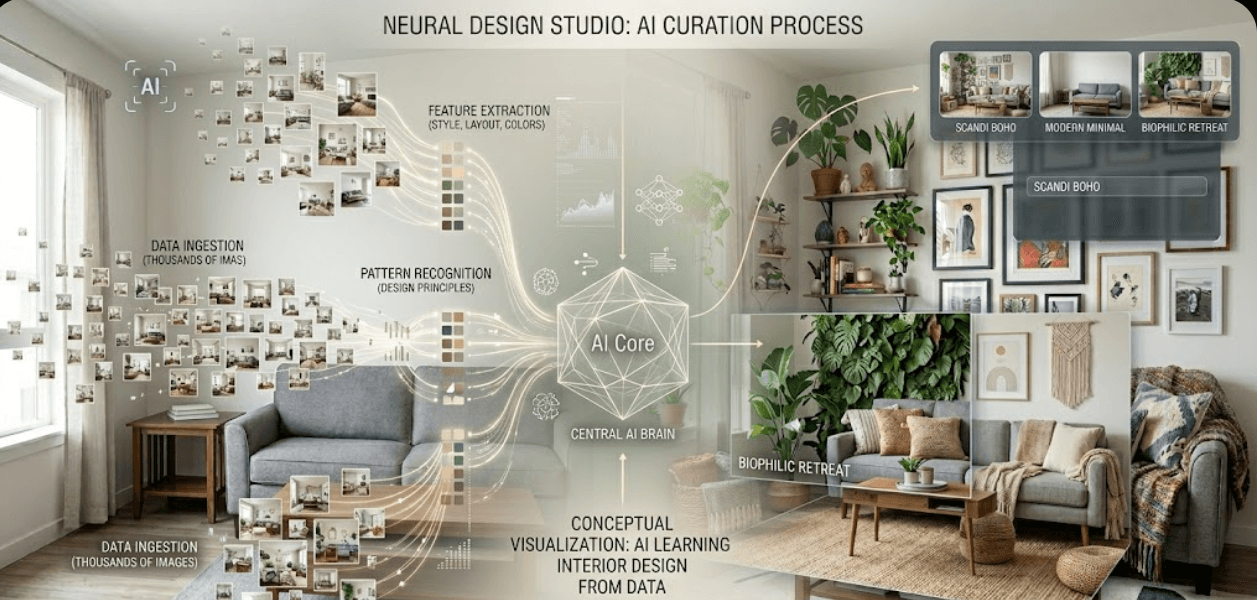
Why AI is Good at Interior Design
AI might seem like a limited tool, but it's genuinely effective at interior design for specific reasons:
Reason #1: Pattern Recognition
AI excels at spotting patterns humans might miss. After analyzing millions of rooms, the AI knows subtle relationships: which color combinations feel cohesive, how furniture scale affects perceived space, why certain lighting placements work, and how room proportion impacts design choices. Humans learn this through experience. AI learns it through data analysis.
Reason #2: Constraint Optimization
AI can juggle multiple constraints simultaneously: budget limits, rental restrictions (no permanent changes), existing furniture (can't replace yet), room dimensions, light conditions, and personal style preferences. The AI finds solutions that satisfy all constraints at once. Humans do this too, but it takes longer.
Reason #3: Speed & Volume
An interior designer can create one or two design concepts in a day. An AI tool can generate 10+ concepts in seconds. This matters because design is subjective — seeing multiple options helps you understand what you actually like.
Reason #4: Accessibility
Professional interior design costs $3,000–$10,000+. AI design tools cost $0–$15/month. AI democratizes design — making professional-level design accessible to people who couldn't afford it otherwise.
Reason #5: Customization
AI can customize designs for specific situations: a small apartment? AI suggests space-saving solutions. A rental? AI avoids permanent changes. Limited budget? AI shows affordable options. Specific style? AI applies that style to your exact room. Humans doing this requires meetings, consultations, and research. AI does it instantly.
Limitations of AI Design: Honest Assessment
AI interior design is powerful, but it's not magic. It has real limitations.
Limitation #1: No Understanding of Feeling
AI can analyze colors and patterns, but it doesn't feel design the way humans do. An AI might suggest a design that's technically perfect — colors are harmonious, furniture is proportional, everything is practical. But it might not feel warm or cozy or inspiring to you. Design isn't just visual — it's emotional. AI optimizes for pattern-based design, not emotional impact.
Limitation #2: Can't See Texture or Detail
AI analyzes photos, not physical spaces. It can't feel how a material actually feels (is that velvet fabric soft or synthetic?), how light actually plays on surfaces, how a space actually smells or sounds, or the true quality of materials. Texture and tactile experience are crucial to how a space feels — and AI simply can't assess these from photos.
Limitation #3: Can't Know Personal History or Meaning
AI doesn't know that your grandmother's painting means everything to you. It doesn't know that you love that specific lamp because your mother gave it to you. AI optimizes for design principles, not personal meaning. The best designed homes include meaningful personal objects — and that's something AI simply can't account for.
Limitation #4: Can't Adapt to Unexpected Issues
What if you get the perfect furniture and it doesn't fit through your door? What if the color looks different in person than in photos? What if you live with the design and realize something doesn't work? AI can't troubleshoot or adapt the way humans can. Real design is iterative — it changes as you live with it.
Limitation #5: Relies on Training Data Quality
If the AI was trained primarily on luxury, large, bright apartments, it might struggle with designing small, dark, budget apartments. The quality of training data directly impacts design quality. AI is only as good as the data it learned from.
Accuracy & Reliability: How Accurate Is AI Design?
Here's the honest truth: AI interior design is accurate at generating technically sound designs, but accuracy depends on what you're measuring.
What AI Gets Right
- Color harmony: AI correctly identifies color combinations that work together — accuracy level: 85–95% for technical design principles
- Furniture proportion: AI understands scale and spacing
- Functional layout: AI creates layouts where traffic flow works
- Light optimization: AI suggests solutions for lighting challenges
- Style consistency: AI applies chosen styles accurately
What AI Might Miss
- Personal taste: The design might be technically perfect but not your style — accuracy level: 50–70% for subjective assessment
- Real-world constraints: AI can't see that your room has a weird alcove or sloped ceiling (unless you tell it)
- Emotional resonance: A design might be correct but not feel right to you
- Trend awareness: AI learns from past data, not cutting-edge current trends
The Best Way to Use AI Design
Treat AI as a starting point, not a final answer. Use AI to generate ideas you might not have thought of, understand what works technically, see how different styles apply to your room, get inspiration, and create shopping lists. Then use your own judgment: Does this feel like home? Would I be happy living with this design?
Is AI Design Safe? Data Privacy & Security
When you upload a photo of your room to an AI tool, legitimate questions arise: Is my data safe? Who has access to my photos? What happens to my data?
How Data is Protected (Good Companies)
Legitimate AI design companies encrypt photos during upload and storage, don't share your photos with third parties, delete photos after design generation (or allow you to delete them), have privacy policies explaining data usage, and follow data protection laws (GDPR, CCPA, etc.). Decory AI clearly states how photos are used and protected.
What to Check Before Using Any AI Tool
- Read the privacy policy (yes, really)
- Check if photos are deleted automatically or stay on servers
- Verify the company doesn't sell data to third parties
- Confirm encryption during upload
- Look for data protection certifications
- Avoid tools that require excessive personal information
- Use reputable companies with established reputations
The Future of AI Interior Design: What's Next?
AI interior design is still evolving. Here's what experts expect:
Improvement #1: Better 3D Visualization
Currently, AI generates 2D images. Future AI will generate interactive 3D models — you'll be able to walk through designs virtually before buying anything. You'll see how furniture actually looks in your space from every angle.
Improvement #2: Integration with Shopping
Imagine: AI redesigns your room, then links directly to buy every item. One click and you've purchased an entire design. Some tools like Decory are already exploring this — making design go from inspiration to reality faster.
Improvement #3: AR (Augmented Reality) Preview
Future tools might let you use your phone to preview designs in real-time — point your phone at your room and see how the redesign looks overlaid in real life. True visualization before purchase.
Improvement #4: Emotional AI
AI might learn to understand personal preferences better, generating designs that feel right for you specifically, not just technically correct. AI gets better at the subjective, emotional side of design.
Improvement #5: Sustainability Integration
Future AI will prioritize sustainable design — suggesting eco-friendly furniture, long-lasting pieces, and upcycling solutions automatically. AI trained on sustainable design trends will make sustainable choices the default, helping design for impact, not just aesthetics.
Frequently Asked Questions
How does AI learn interior design?
AI learns by analyzing millions of interior design photos. It identifies patterns: which colors work together, how furniture should be proportioned, what makes spaces feel bigger, how lighting affects mood. After analyzing enough examples, it can apply those patterns to any new room.
Is AI interior design accurate?
AI is 85–95% accurate at technical design — color harmony, furniture proportion, functional layout. It's 50–70% accurate at subjective preferences — whether a design feels right to you personally. Use AI for inspiration and technical guidance, then apply your own judgment.
Does AI copy existing designs or create new ones?
AI doesn't copy specific designs. Instead, it learned patterns from millions of designs, then combines those patterns in new ways for your specific room. Each output is unique to your room and your style preferences.
Can AI replace interior designers?
Not entirely. AI is excellent at generating technical designs quickly and affordably. But interior designers bring creativity, emotional understanding, personal touches, and real-world problem solving that AI can't fully replicate. AI is a powerful tool for designers and homeowners alike — not a replacement.
How long does AI design generation take?
Most AI tools generate designs in 30 seconds to 2 minutes — far faster than human designers (who typically take days or weeks). This speed allows you to see and compare multiple options in minutes.
The Bottom Line: AI Interior Design Demystified
The Practical Reality
AI interior design works by learning from millions of examples, identifying patterns, and applying those patterns to your specific room. It's not magic — it's math, data analysis, and pattern recognition. What AI does well: generates ideas quickly, understands technical design principles, provides affordable options, and handles multiple constraints simultaneously. What AI doesn't do well: replace human creativity and emotional intuition, understand personal meaning and history, or troubleshoot unexpected real-world issues.
The future of AI design will improve dramatically — 3D visualization, AR previews, better emotional understanding, and sustainability focus. But AI will remain a design tool, not a replacement for human judgment. Understanding how AI works builds trust. Now you can use AI interior design confidently, knowing exactly what it's doing and what its limitations are.
Ready to Transform Your Space?
Use Decory's AI-powered design tools to visualize your transformation. Upload a photo and explore endless possibilities in seconds.
Try Decory AI Now