How to Use AI to Decorate a Room

Decorating your home used to mean hiring an interior designer or scrolling endlessly through Pinterest. Today, artificial intelligence (AI) has revolutionized the process. From visualizing design themes to shopping for furniture, Decory and similar AI tools make room decoration accessible, fast, and personalized.
If you're wondering how to ai decorate my room or decorate room with ai, this guide shows the practical steps using tools like Decory.
What Is AI Interior Design?
AI interior design uses machine learning algorithms to analyze space, style preferences, and user inputs to generate design suggestions. It often integrates image recognition, layout prediction, style matching, and even shopping recommendations into one seamless experience.
Why Use AI to Decorate Your Room?
Whether you're styling a studio apartment or redesigning your living room, AI offers:
- Instant visualization: Upload a photo and get realistic room mockups.
- Style-matching: Based on modern, boho, minimalist, or classic decor trends.
- Budget personalization: AI suggests items that align with your financial plan.
- Quick edit: You can customize individual elements like color, furniture, or lighting.
- One-click shopping: Purchase directly from platforms like Amazon within the app.
These capabilities make ai decorating and the ability to decorate with ai accessible to anyone — from DIY decorators to busy homeowners.
Step-by-Step: How to Use AI to Decorate a Room
1. Choose a Reliable AI Platform
Start with a trusted tool like Decory.ai, available on iOS, Android, and the web. Decory stands out for its clean interface, realistic renderings, and support for Arabic and English.
2. Upload or Scan Your Room
Use your phone's camera or upload existing images. Decory's AI processes room dimensions, lighting, and structure to generate tailored designs. Uploading accurate photos is the fastest way for the app to ai decorate my room precisely.
3. Select a Design Theme
Options include:
- Modern minimalism
- Boho-chic
- Scandinavian
- Industrial loft
- Luxury classic
AI matches themes with layout feasibility, color palettes, and decor trends — a core feature when you want the AI to decorate room with ai fidelity.
4. View and Edit Suggestions
You can view multiple generated looks. Don't like a lamp? Replace it. Want more color? Adjust the palette. Platforms like Decory offer editable zones so you remain in control.
5. Shop Instantly
With integrated shopping features, Decory allows you to buy suggested items directly from popular retailers. No more searching item by item.
Use Case: AI Living Room Design
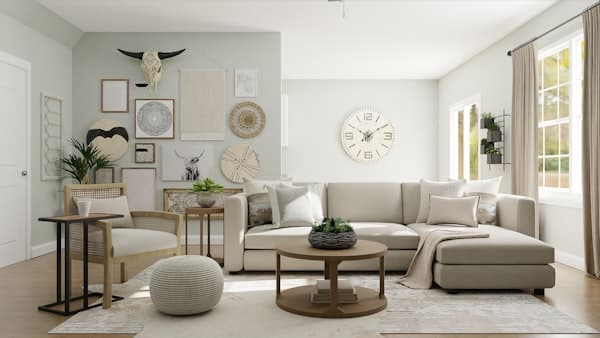
Living rooms are complex spaces combining function and style. AI tools like Decory ensure:
- Optimized furniture arrangement
- Harmonious color schemes
- Lighting that complements the room's purpose
- Smart storage suggestions
Example: A New York apartment user uploaded a dimly lit, cluttered living room. Decory generated three layout options, emphasized light-enhancing decor, and replaced bulky furniture with multi-functional pieces—all within minutes. This demonstrates how easily you can decorate with ai to solve real layout problems.
Key Features of Decory.ai
Room Design Generation: Upload room photos or input dimensions for instant design — ideal for users who want the AI to ai for room decorating accurately.
- Editable Output: Customize areas—fabrics, color, furniture—independently.
- Real-time Shopping: Shop furniture and decor from linked vendors.
- Multilingual Support: Bilingual (Arabic/English) interface.
- Community Sharing: Showcase your space, draw inspiration, or crowdsource feedback.
Trends AI Can Capture Better Than Human
AI doesn't just react—it predicts. Based on data from thousands of designs, AI tools can identify:
- Rising color trends (e.g., muted greens, terracotta)
- Popular layout shifts (open concept, biophilic design)
- High-performing decor styles in specific regions (e.g., Scandinavian in Canada, Boho in UAE)
Because AI analyzes huge datasets, it's especially effective at spotting patterns in ai decorating and helping users decorate with ai in ways that suit local tastes.
Benefits of Using Room Decor AI
Using decor AI offers several key advantages over traditional interior design methods. While traditional design processes often take days or even weeks to produce an initial concept, AI can generate multiple design options in seconds. This speed doesn't compromise quality—AI tools are trained on millions of professional designs and can match or exceed human-level aesthetic judgment. If you want a quick way to ai decorate room without the wait, AI is a great option.
Final Thought
Whether you're a homeowner in Toronto, a DIY decorator in Dubai, or an interior designer in London, AI-powered room design tools like Decory redefine what's possible in home decor. With instant visualization, personalized suggestions, and integrated shopping, AI makes professional-quality design accessible to everyone.
👉 Ready to transform your space? Download Decory for iOS or Android, and let AI bring your dream room to life. Use Decory to ai decorate my room today.
FAQ
1. How can I use AI to decorate my living room?
AI-powered tools like Decory let you upload a photo of your space and instantly generate multiple interior design ideas tailored to your style preferences, room layout, and budget. This is the easiest way to ai decorate my room or ai decorate room.
2. Is AI interior design better than hiring a designer?
AI doesn't replace human creativity but enhances it. It gives you quick, affordable, and personalized inspiration—ideal for DIY decorators or early-stage planning.
3. Can I shop for furniture directly from AI-generated room designs?
Yes! Apps like Decory integrate real-time shopping features, allowing users to purchase furniture and decor items directly from the design interface — a seamless way to decorate with ai and complete your room.
4. Is AI room decoration accurate to my space dimensions?
Many AI platforms, including Decory, support inputting your room's dimensions to deliver scale-accurate and realistic interior designs. When you input measurements, the AI can ai for room decorating with better accuracy.
Ready to Get Started?
Transform your space today with Decory.ai. Upload a photo and see your room redesigned in seconds with AI-powered technology.
Try Decory AI Now